
How to Play
One desk, one case: you open an exhibit, mark what matters in your own words, and your marks build the timeline and the notebook that keep your thinking honest. Then you finish the episode: you file your answers, and you say which exhibits prove them. Start with the chapter you need. Nothing here has to be read in order.
You will not need most of it. Anywhere in the game you see a ? beside a heading or a control, pressing it explains that one thing where you are standing, without losing your place.
The Desk
A new episode every Sunday: a set of exhibits, and a few questions to answer before the next episode opens. This case in the top menu takes you to the current case.

The exhibits
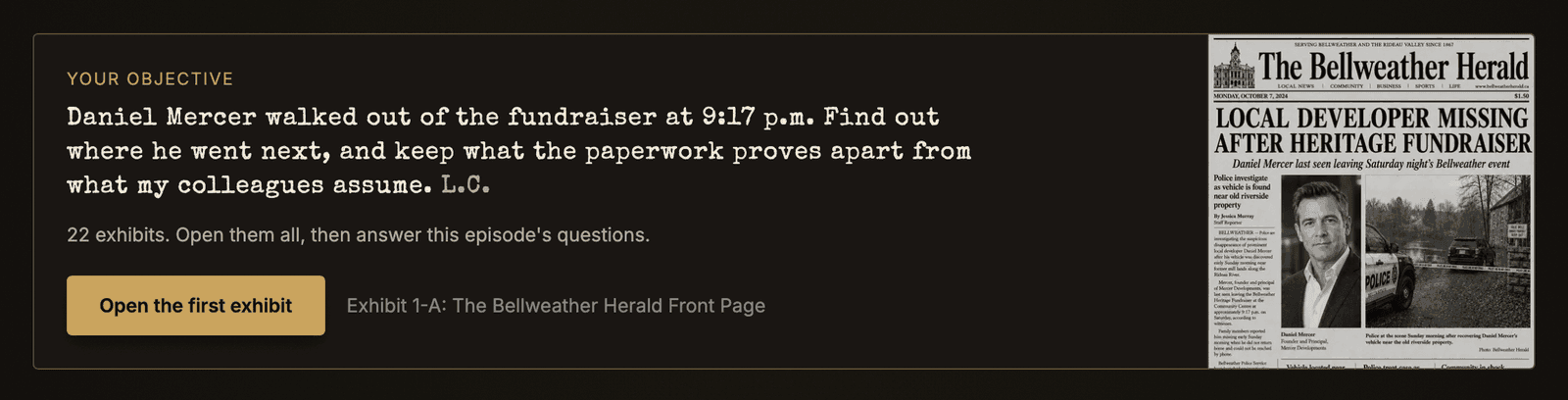
At the top of each episode, Your objective is Det. L. Carver's question for that episode, with Open the first exhibit beside it. Once you have opened an exhibit it shrinks to one line, and the desk keeps the same line above your Notebook and Timeline (Hide folds it away). From Episode 2, what you wrote at the end of the last episode sits under it, with a link to change it.

Every exhibit in the episode is a card on the episode page. A ✓ Reviewed beside a card's label means you have opened it, so you can see at a glance what you have not read. On timeline · 2 at the foot of a card counts what you have put on your timeline from that exhibit.
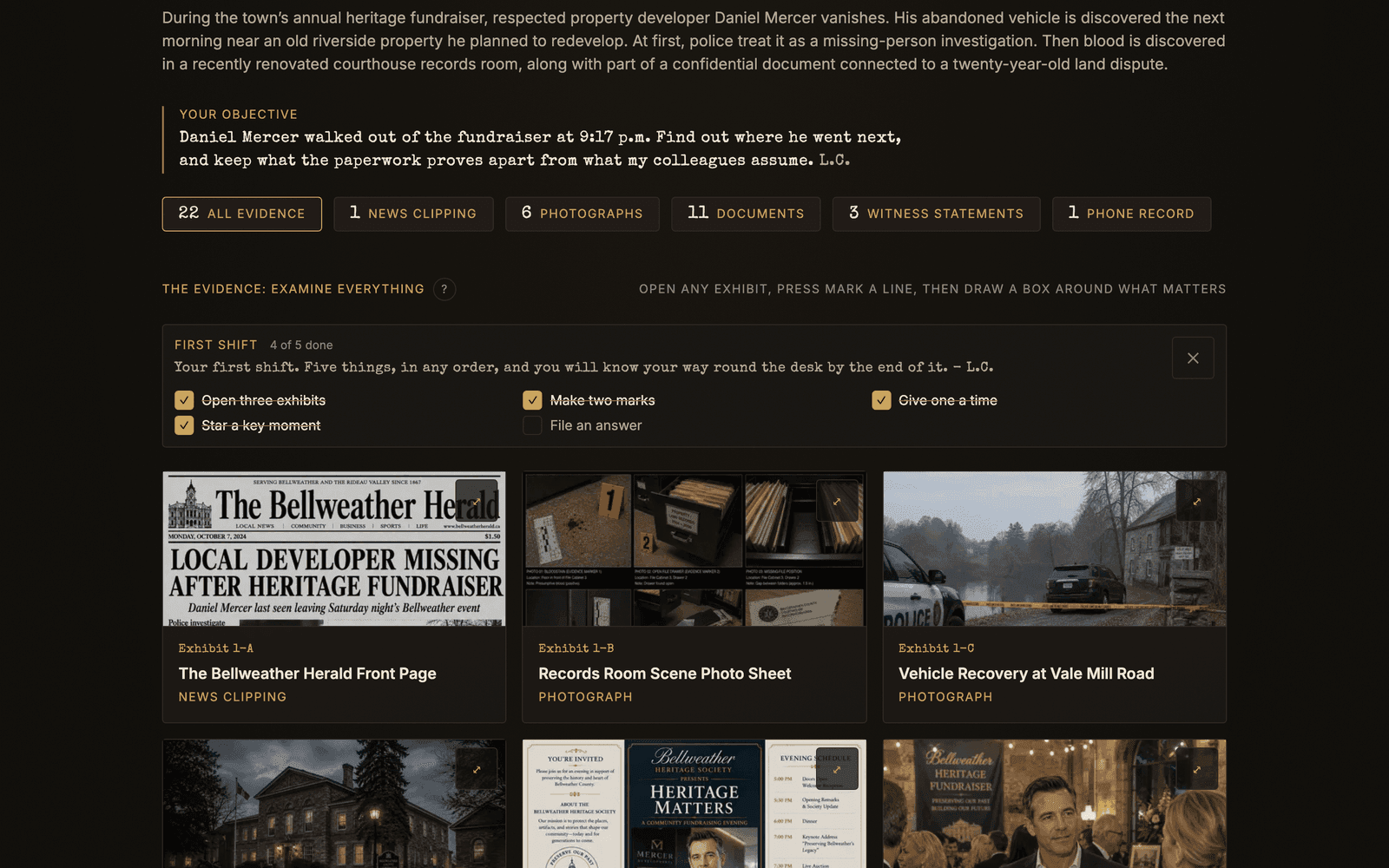
On Episode 1 a short First shift checklist sits above the cards: open three exhibits, make two marks, give one a time, star a key moment, file an answer. It ticks itself as you go and puts itself away when you are done.
A new player gets the desk in stages. Your objective shows a bar for the six exhibits to start with, then six more once all six are opened, then the rest. Open the next exhibit picks up where you are, and from the second six Show the whole file skips ahead. Questions and scoring are the same.
Signed out, you are asked for an account once, after you open eight exhibits, by a Save your progress card. Create a free account keeps your work, and its email box stays unticked until you tick it. Not now puts the card away. Until you sign up, your work stays in that browser only.
After you sign up, a Pick a detective name card asks for the name the leaderboard shows. You can set it only once, and Not now leaves it for your account page. Clearance comes when the full file opens.
Opening an exhibit
Tap or click a card and the exhibit opens full screen on the desk: the page on the left, your Notebook and Timeline for this episode on the right, updating as you work. The desk opens on your timeline; it remembers the tab you last used.
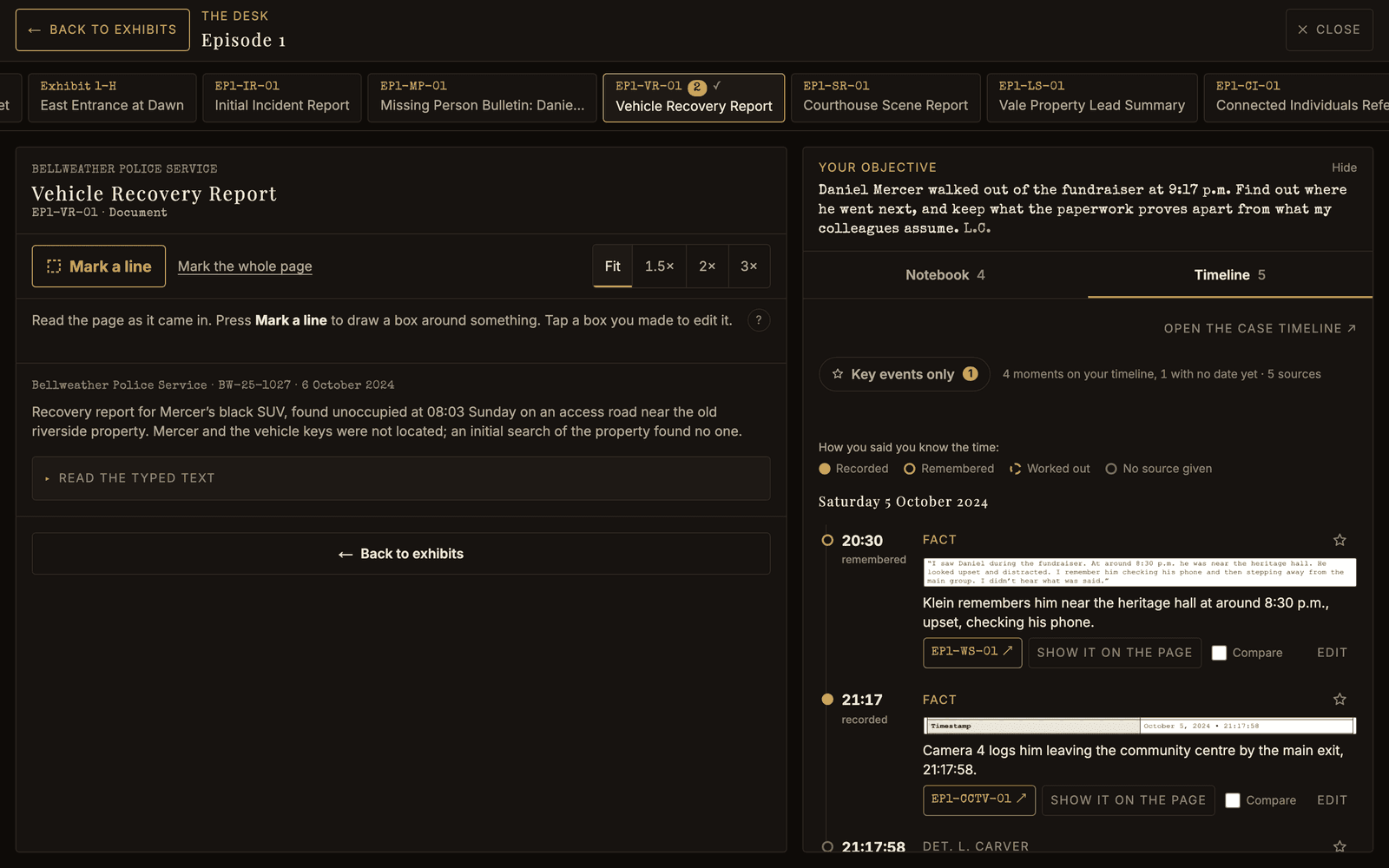
- The tabs across the top are every exhibit in the episode. A tick shows the ones you have opened and a number counts your marks on each. Click one to move to it. With a keyboard, the arrow keys move along the tabs and Enter opens one.
- Zoom with Fit, 1.5×, 2× and 3× above the page, or pinch, or double tap. Zoomed in, drag, or scroll with a trackpad or wheel, to move around. With the keyboard, focus the page: Enter zooms in, the arrow keys move around, and Enter again fits it back.
- Read the typed text, under some pages, gives you the document's own words.
- The tip line, if your clearance has one, sits under the page too.
← Back to exhibits, top left and again at the end of every exhibit, takes you back to the cards. You land on the card of the exhibit you were reading. ✕ Close, or Escape, does the same. Escape steps back one thing at a time: an open sheet first, then Mark a line, then the desk.
On a phone
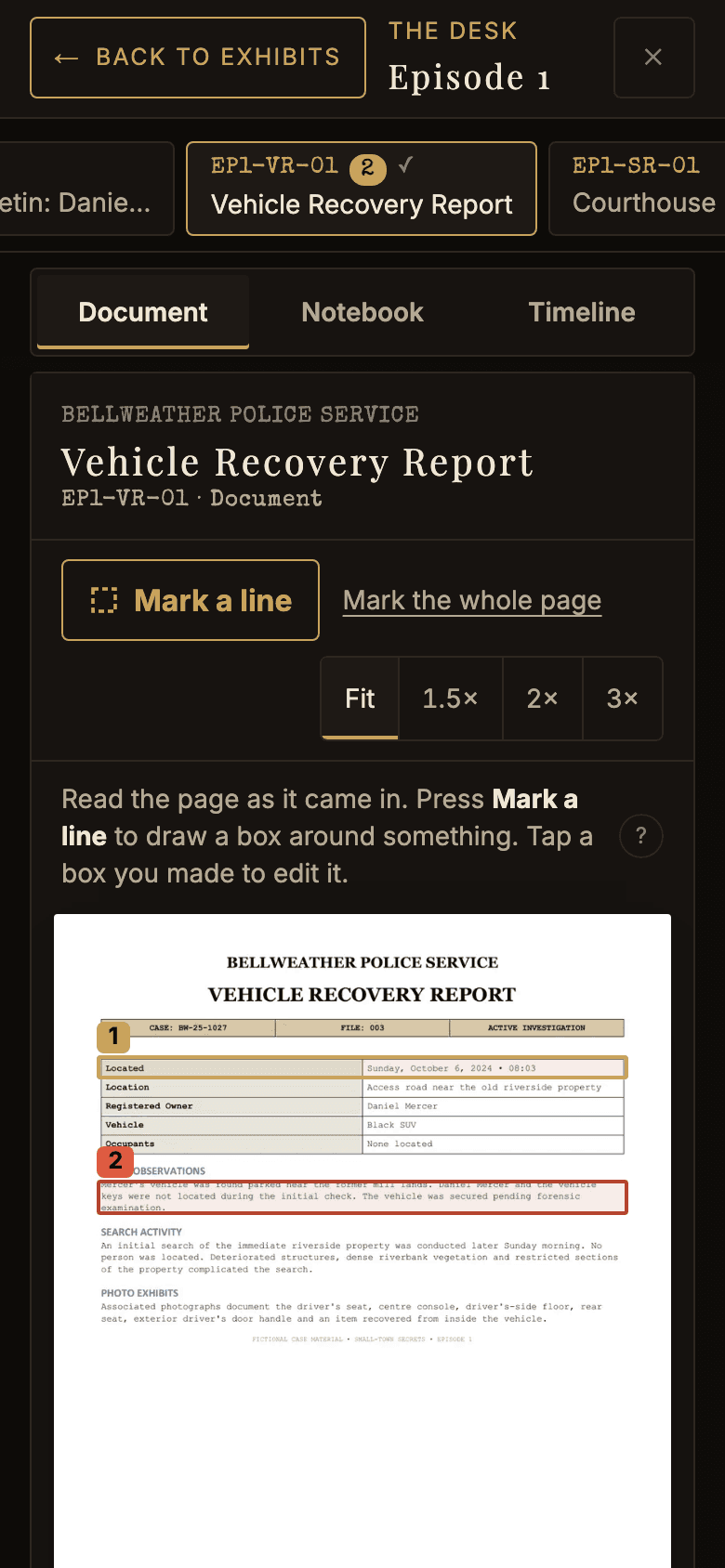
The page and your notes cannot sit side by side on a small screen, so a switch at the top shows one at a time: Document, Notebook or Timeline. At Fit, a sideways swipe on the page moves to the next exhibit.
Open every exhibit before you answer
There are no questions on the desk. They wait at the foot of the episode page, and stay shut until you have opened every exhibit in the episode once. Opening one from its card, its tab or a swipe all count, and you do not have to finish reading it. Finishing an Episode covers the rest.
Two things you will meet while you work:
- The tip line. Call the tip line for a lead reveals one lead on an exhibit. At Observer, leads appear on the exhibits by themselves and earn no bonus. At Detective you get three calls an episode, and calls you do not use earn bonus points. At Investigator you see Tip line off at this clearance. Change clearance on the episode page, or on your account page.
- Confidence. Every scored answer carries a confidence level you choose. A hunch risks nothing. Certain pays more and costs more.
Ruling somebody out
The Persons of Interest are the row of faces under the case page's picture. Tap any of them to read their dossier, and press Rule … out once you are satisfied somebody did not do this. A red X goes over the portrait and a line above the row keeps the count.
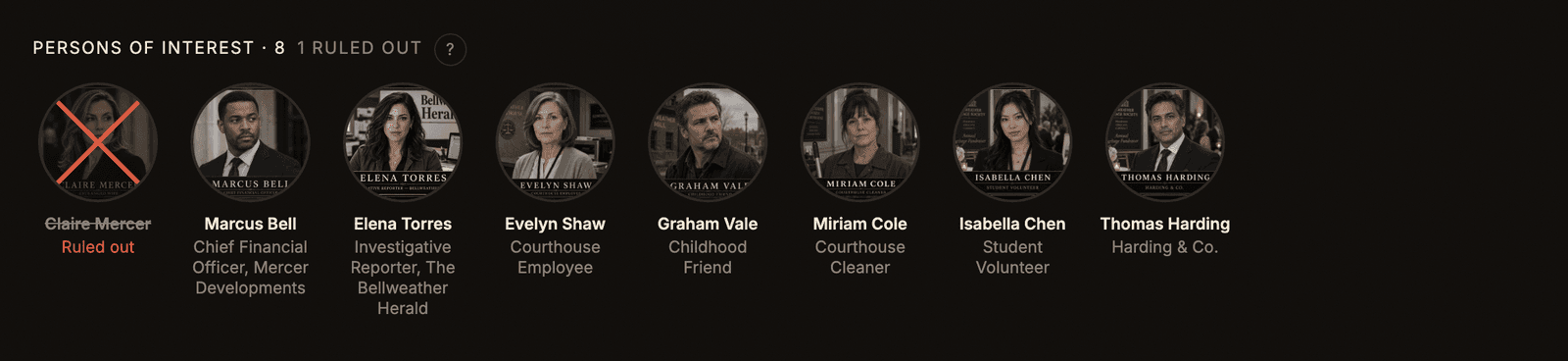
It is your own working note. Nobody is told, it is not part of what you file, and the game will not tell you whether you were right. Finding that out is the case. The same button puts them back on the board whenever the case turns.
What stays yours
The case material is protected from copying: select an exhibit, its typed text or a question and you get a line pointing at the site instead.
Everything you write is the opposite, and always will be. Your marks, notebook, timeline, theory and answers are yours to copy and keep anywhere you like.
Marking
A mark is the line that says it, boxed where you found it, with what it tells you in your own words. It is how everything gets into your notebook and onto your timeline, and it keeps the words on the page they came from, so when two marks disagree you can go back and read both.
Mark a line, and draw a box
Press Mark a line above the page. The page stops scrolling and waits for a box:
- With a mouse, drag across the part that matters.
- On a phone, tap two opposite corners.
- With a keyboard, focus the page and press Enter. The arrow keys move the box, Shift and the arrows resize it, and Enter marks it.
Press Mark a line again to go back to scrolling.
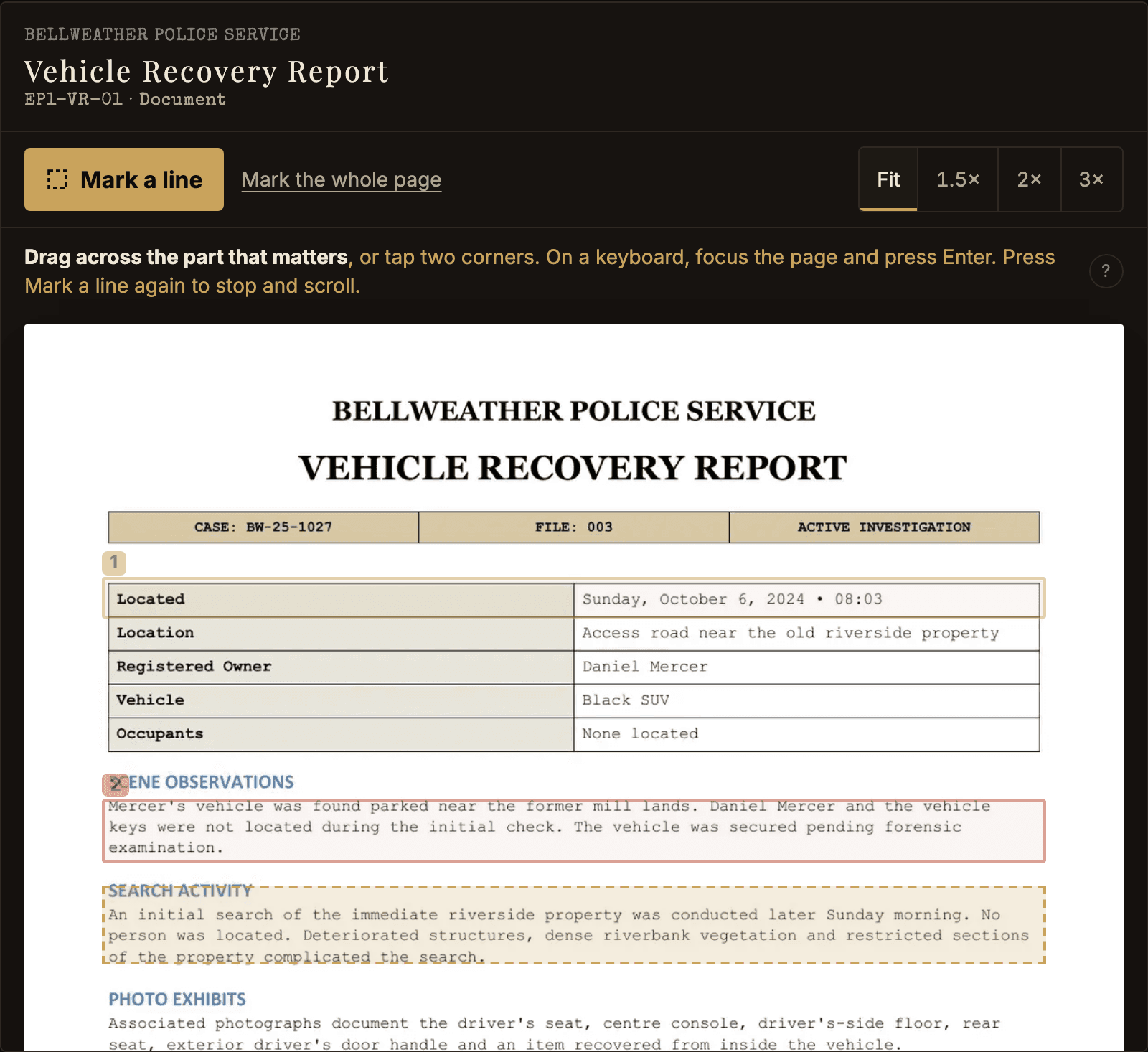
Your marks stay drawn on the page, numbered, so you can see what you have already said about an exhibit. A solid box is a fact, a dashed one an assumption, a red one a question. Tap a box you made to change it.
Mark the whole page saves drawing a box round everything. An exhibit that cannot be boxed, such as a recording, has Mark this exhibit instead, with room for a time into the recording.
What did you find?
As soon as the box is drawn, the sheet opens with your mark at the top.
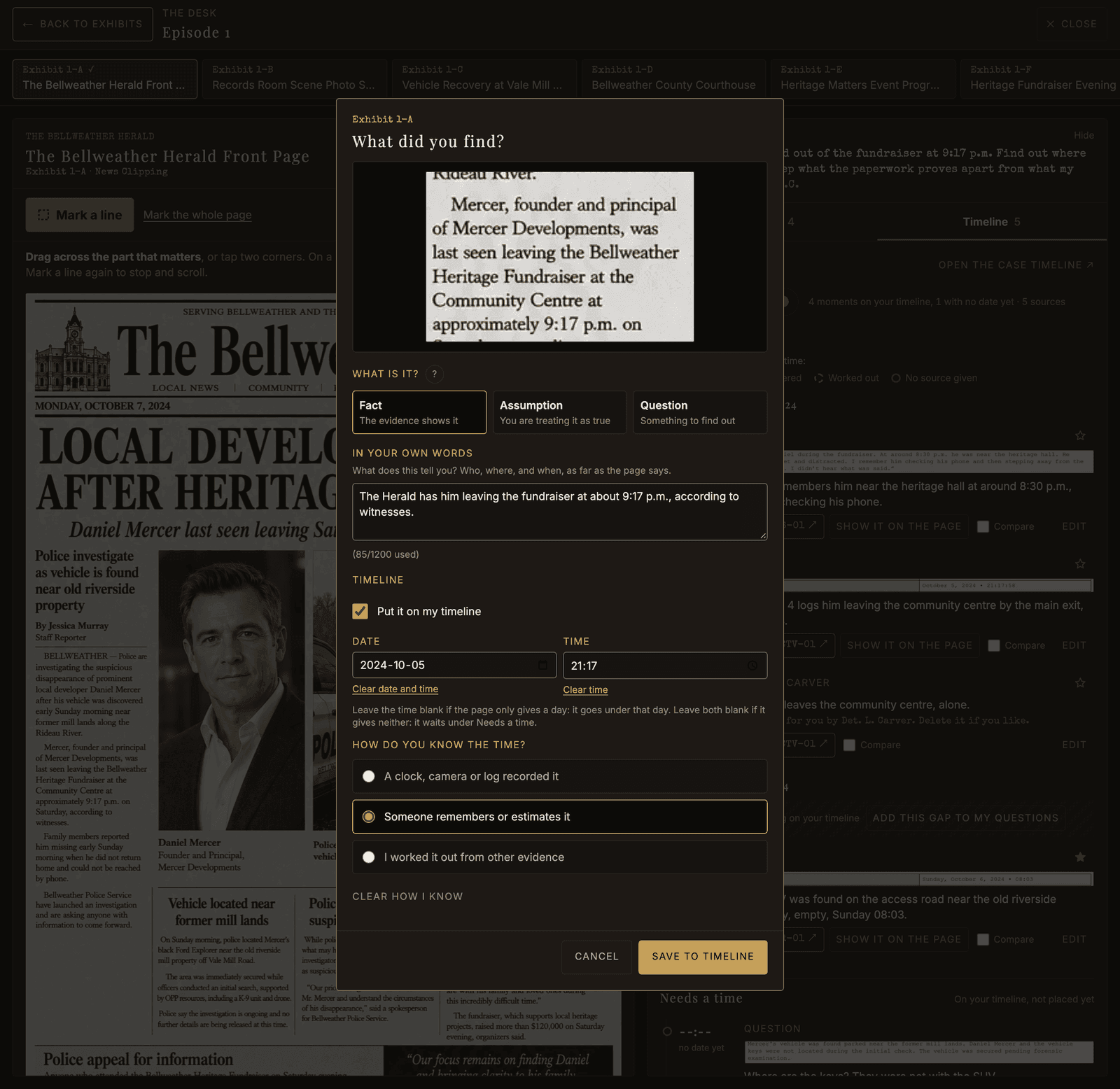
- What is it? Pick one. Fact: the evidence shows it. Assumption: you are treating it as true. Question: something to find out. Keeping them apart is half the game.
- In your own words: who, where and when, as far as the page says.
- Put it on my timeline, if it happened at a time. Your Timeline and Notebook covers what the date, time and "how do you know" fields do.
Save to timeline puts it in your notebook and on your timeline together. Without the timeline ticked, the button reads Save mark.
Nothing is filled in for you
The sheet opens blank, every time, at every clearance. It never copies the document's title, its date or its words into your mark, and the date and time pickers start empty. Only the kind starts on Fact, and you can change it.
That is deliberate. The case is in what you notice and how you say it, and a sheet that wrote it for you would be doing the one part that is yours.
Changing a mark
Tap its box on the page, or press Edit beside it in your notebook or timeline. The same sheet opens with what you wrote. Delete mark removes the mark and its place on the timeline together, and Undo brings both back.
Your Timeline and Notebook
Your marks go two places at once. The timeline puts the ones with a time in order, so you can reconstruct the night and see where it goes quiet. The notebook keeps all of them, sorted into what the evidence proves, what you merely suspect and what you still need answered.
Putting a mark on the timeline
Tick Put it on my timeline on the mark sheet and type the Date and Time the page gives. You type them yourself: nothing is copied from the document, and nothing stops you disagreeing with it. The line under the two boxes says the day and time back in words, so check it before you save.
Then say how you know the time:
- A clock, camera or log recorded it: recorded.
- Someone remembers or estimates it: remembered.
- I worked it out from other evidence: worked out.
The timeline shows the difference as a dot beside each time: solid for recorded, hollow for remembered, dashed for worked out. A witness's "around half eight" and a camera's 21:17:58 are not the same kind of fact.
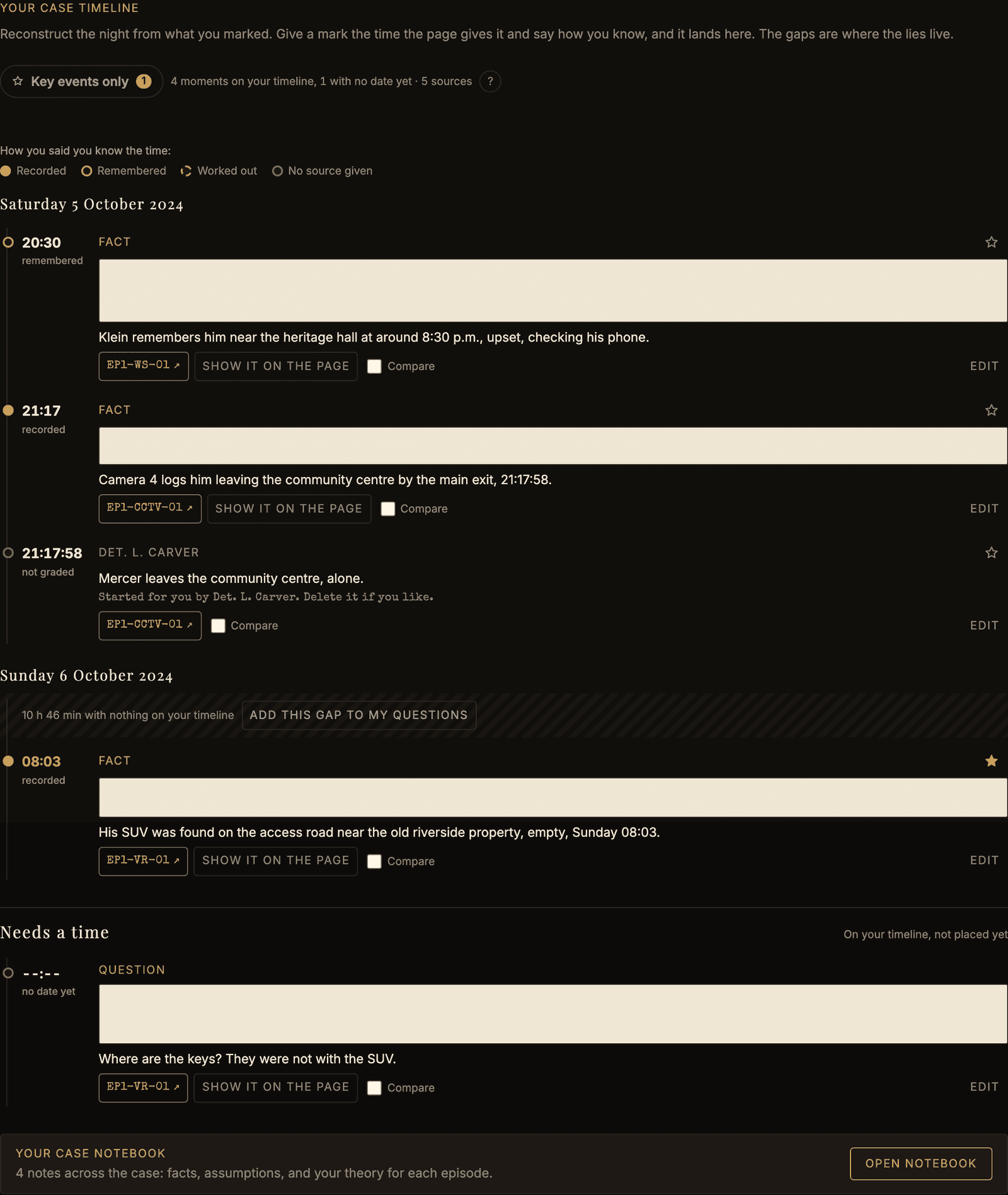
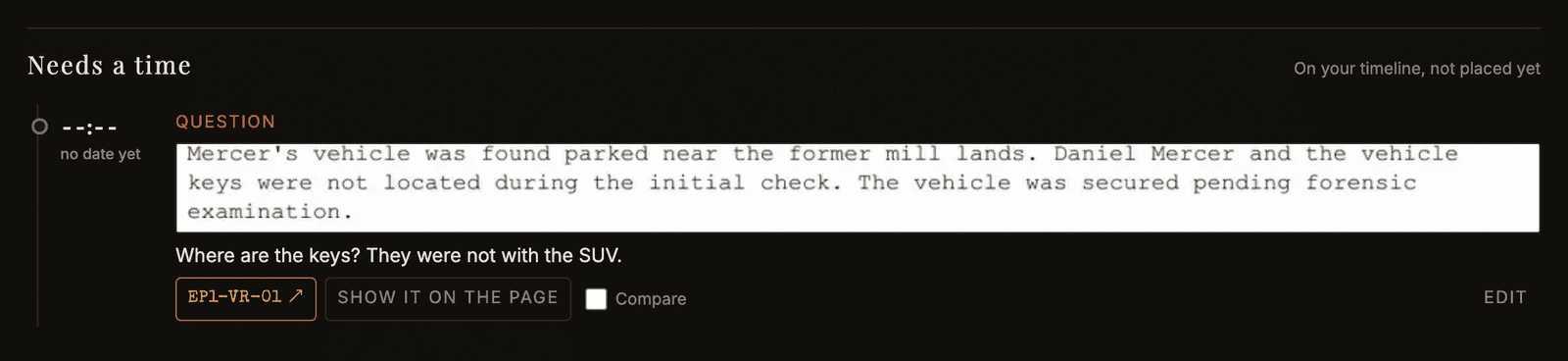
Needs a time
Leave the time blank and the mark goes under its day, as Sometime that day, above the times. Leave the date blank too and it waits under Needs a time at the bottom. Clear time and Clear date take a value back out. Edit it once you know, and it moves into place. Both lists are sorted by exhibit, so the lines from one exhibit sit together.
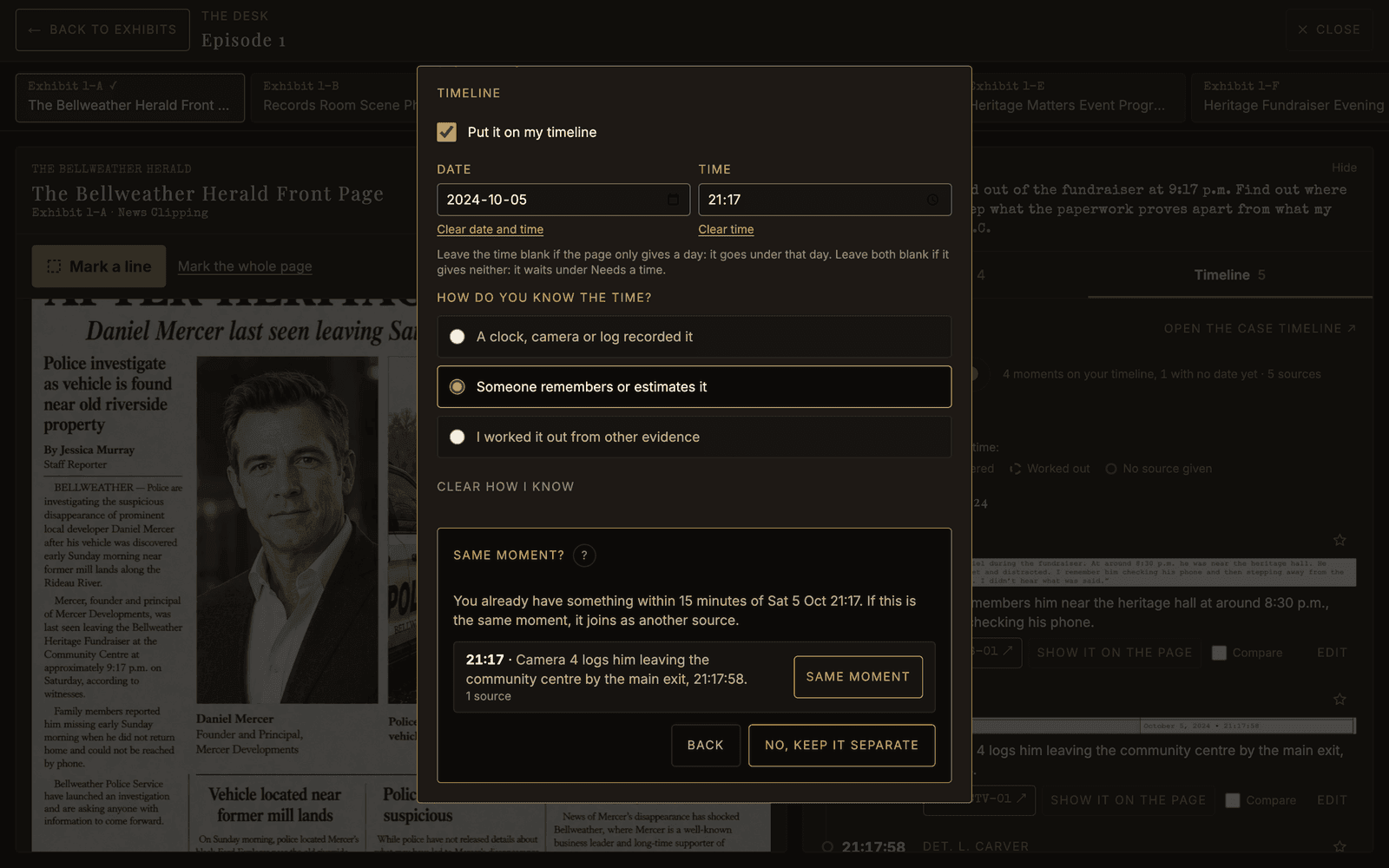
Same moment?
Save a time within 15 minutes of one you already typed and the sheet asks whether it is the same moment. Same moment joins them as two sources of one moment, which then shows both times and how far apart they are. No, keep it separate saves it on its own. Nothing is joined unless you say so, and Take this out of its moment splits it back out.
Key events and gaps
Every placed moment has a star. Star the ones your theory rests on, then press Key events only to see just those: your case in a few lines.
A stretch of two hours or more with nothing on it shows as a band, such as 10 h 46 min with nothing on your timeline. The gaps are where the lies live. Add this gap to my questions puts a question in your notebook, using your own two times.
Compare sits under every source. Tick two, press Compare them, and read them side by side. Add these two to my questions starts a question naming both.
Where the timeline lives
- On each episode page, under the exhibits, is that episode's timeline.
- Timeline in the top menu is the whole case, day by day, with a button for each episode. Its Add from an exhibit list opens an exhibit with Mark ready, your current episode first.
- Timeline, on the right of the desk, is the one you are adding to as you mark. The desk opens on it, or on the Notebook if that is the tab you last used.
It is one timeline, shown three ways. In Part One, Det. L. Carver starts yours with one example, marked as Carver's. Delete it if you like.
The notebook
On the desk, the Notebook side lists this episode's marks under Facts, Assumptions and Open questions, each with its box and your words. Press a mark's label to jump back to its box on the page.
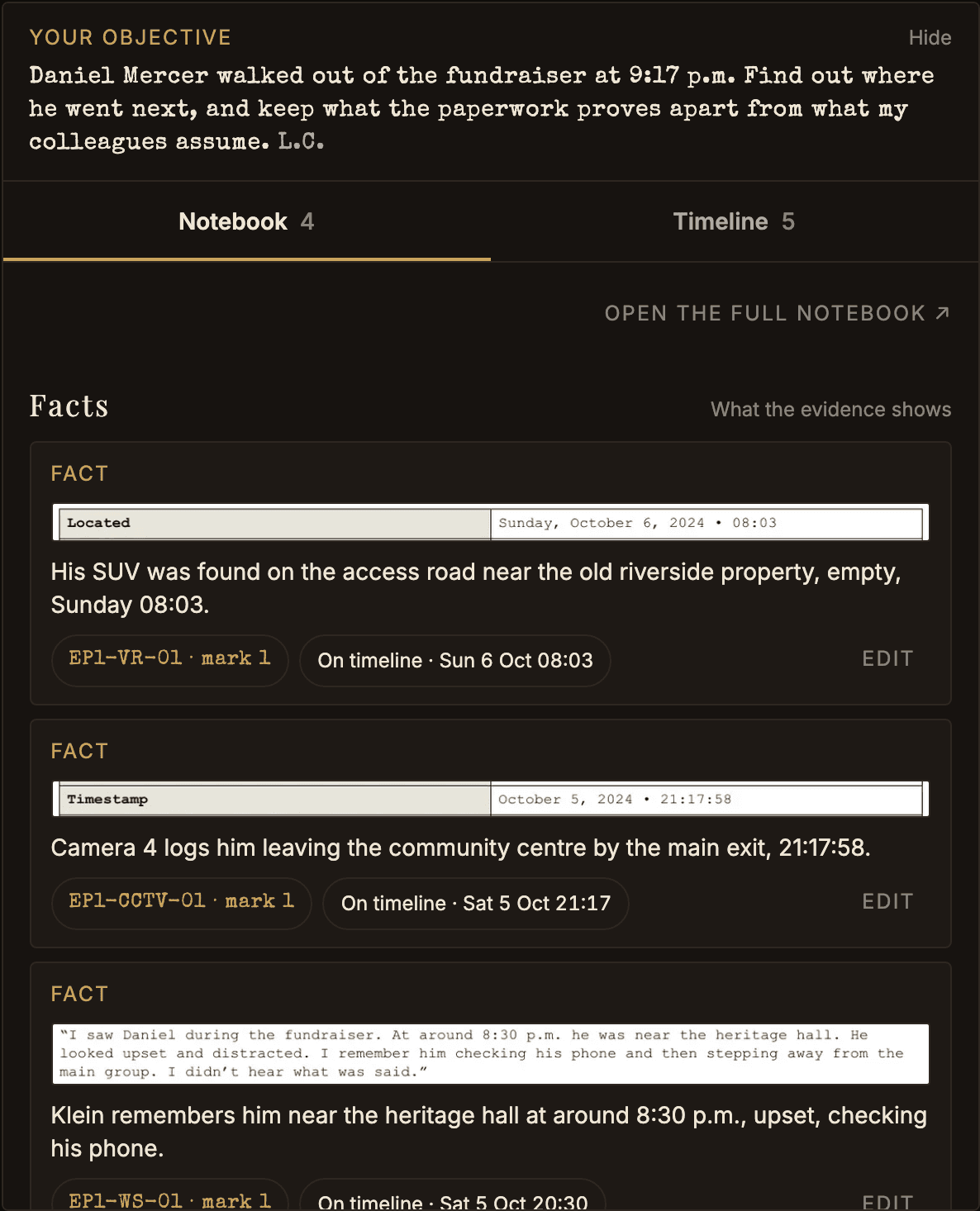
Notebook in the top menu is the whole case. Add from an exhibit works the same way.
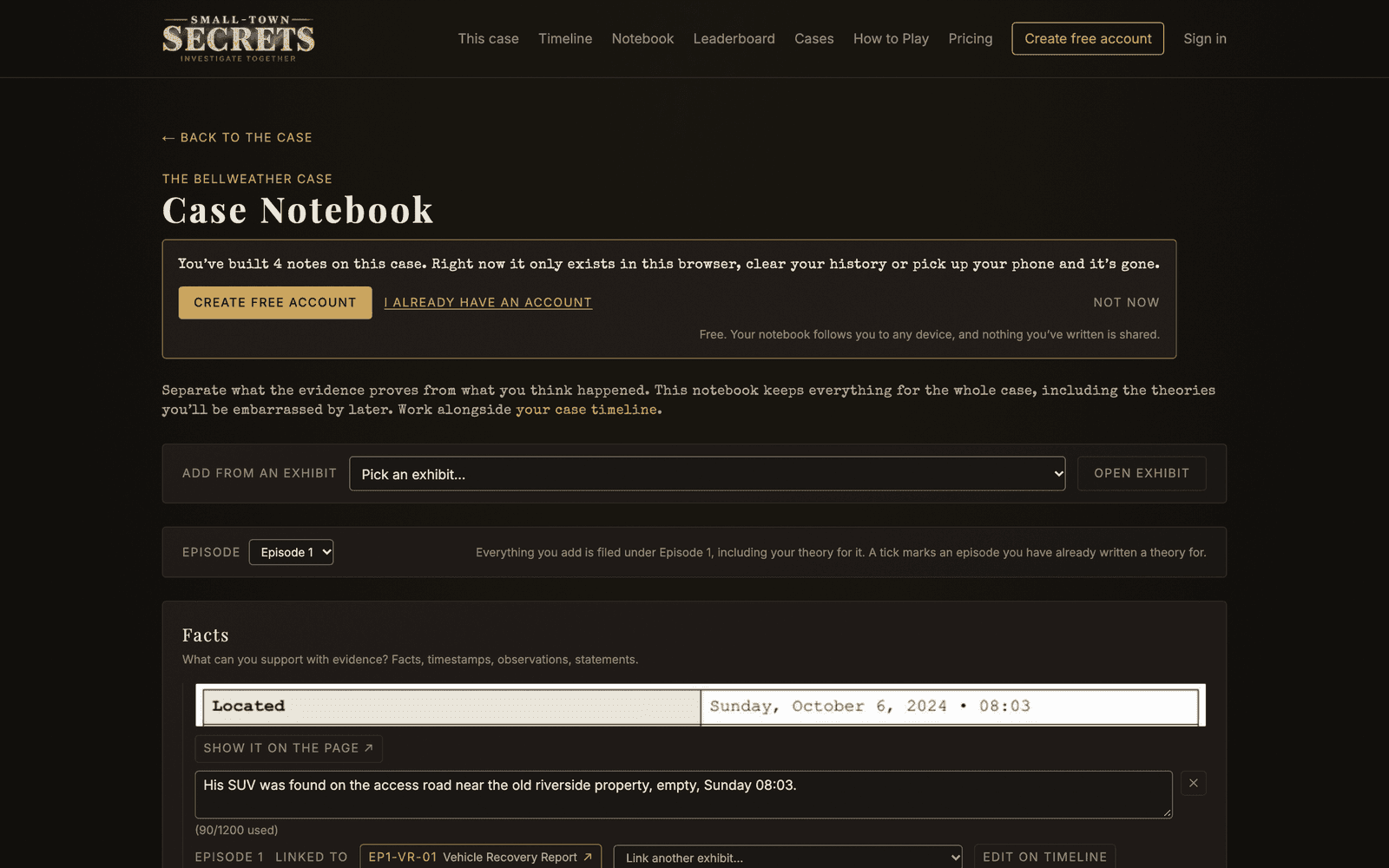
- Facts, Assumptions and Questions hold your marks and any notes you type there yourself. Link another exhibit… ties a note to a second exhibit.
- Timeline Gaps is a small table for stretches of time nobody can account for. Each row has a When, what you know, and what may be missing.
- Who Interests You? is a checklist of the case's people. Tick anyone worth a second look and say why. Untick someone and your reason is kept for a re-tick.
- Evidence to Revisit is your own "look at this again" pile.
Place on timeline, beside a note, a gap or a ticked person, opens the mark sheet with your words in it. Type the date and time yourself, or leave them blank and it waits under Needs a time. It then reads Edit on timeline.
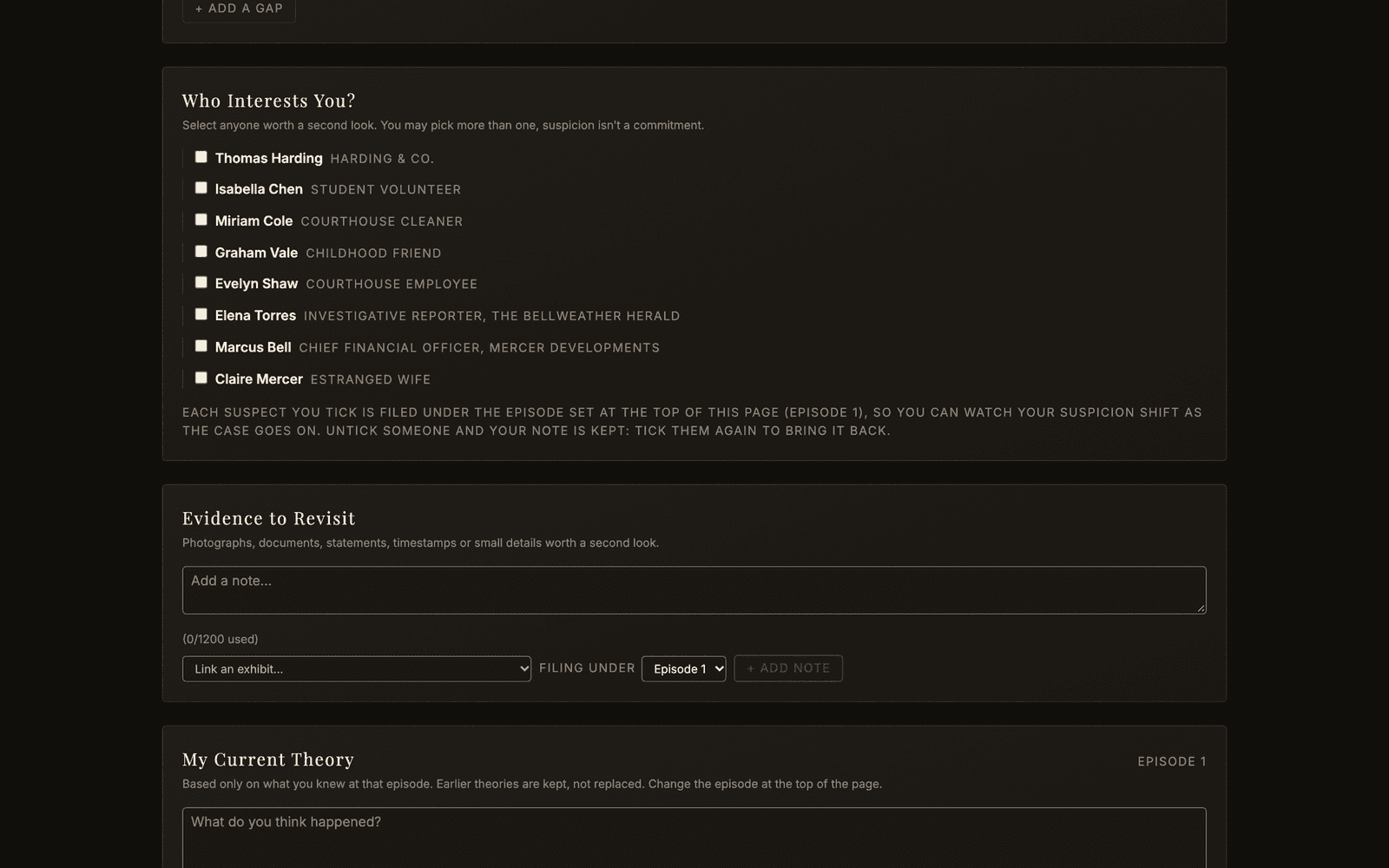
Everything you write here is filed under an episode. The Episode picker at the top sets it and starts on the episode you came from.
My Current Theory
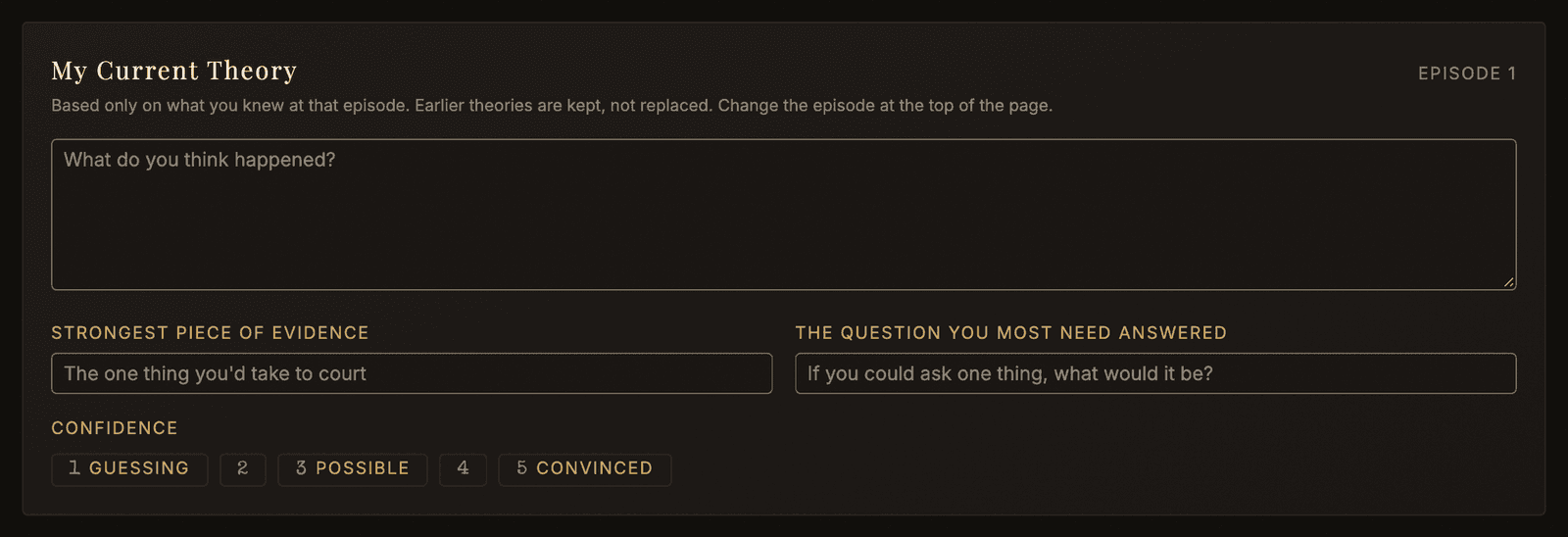
At the bottom, one theory per episode, under the episode set at the top of the page. Nothing here is scored. It exists so that at the finale you can see exactly when you first got it right, or how confidently you got it wrong. Each entry also has your Strongest Piece of Evidence, The question you most need answered and a Confidence from 1 to 5, and How your theory has changed lists the earlier ones.
Finishing an episode asks for the same theory, and for the question you most need answered. Both are the same entry in the same place: what you write in either fills in the other.
One warning, Detective: keep Facts and Assumptions apart. The case punishes people who treat one as the other.
Finishing an Episode
Every episode ends the same way, in one sitting, at the foot of the episode page: you answer the episode's questions, you choose the exhibits that prove the case, and you tell Det. L. Carver what you think happened and what you still need answered.
The foot of the page
While any exhibit is unopened, the foot of the page says how many are left, as in 7 exhibits left to open before the questions open, and Open the next exhibit opens the next one. Open each exhibit once. You do not have to finish reading it.

Open the last and it says The questions are open, above File this episode's answers. The count means you never answer blind.

The first time the questions open, a card, How the questions work, explains which answers are scored now, when the other results arrive, and what each confidence level costs. Got it puts it away on every device.
Come back to an episode you have started and a line at the top, such as 3 questions left in Episode 2, has the next step beside it.
One screen, four steps
- Your answers. Answer them all here. Nothing goes on the record until you press File these answers, so an answer you want back is yours to change until then. Each scored one carries a confidence level: a Hunch pays half and costs nothing when it is wrong, Reasoned pays in full and costs a little, Certain pays half again and takes a real bite when it misses.
- The exhibits that prove it. Choose the exhibits you would put in front of a jury. Right after you file, a line at the top such as 2 of 3 answers correct sums up the scored answers. One whose result is not ready says Filed. Results when Episode 4 opens, with the date. A written answer says Not scored. See your answers opens each one.
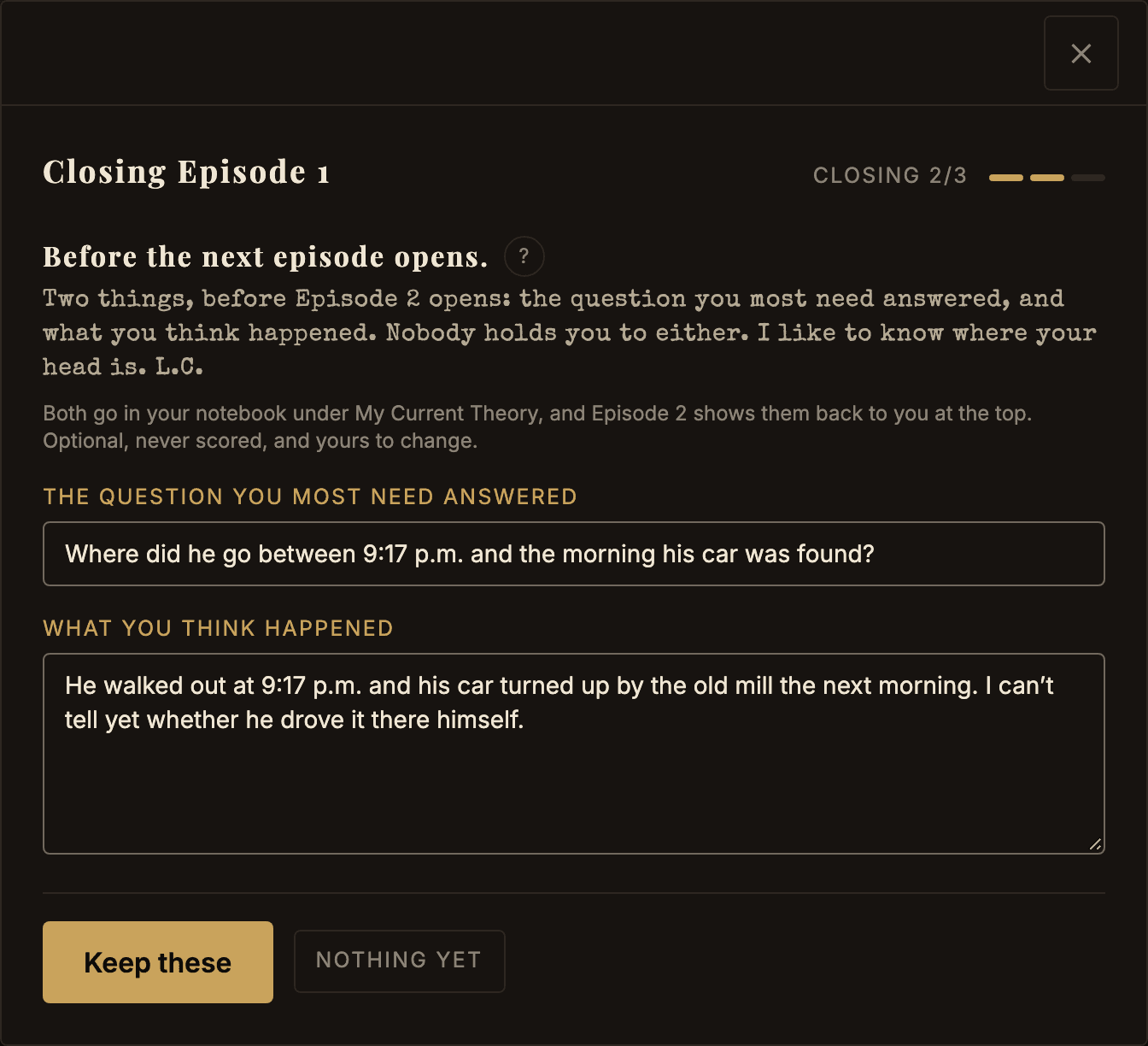
- Before the next episode opens. Carver asks for the question you most need answered and what you think happened. Neither is scored or final, and both live in your notebook under My Current Theory. The next episode shows them back to you at the top. Keep these saves them. Nothing yet skips it and writes nothing.
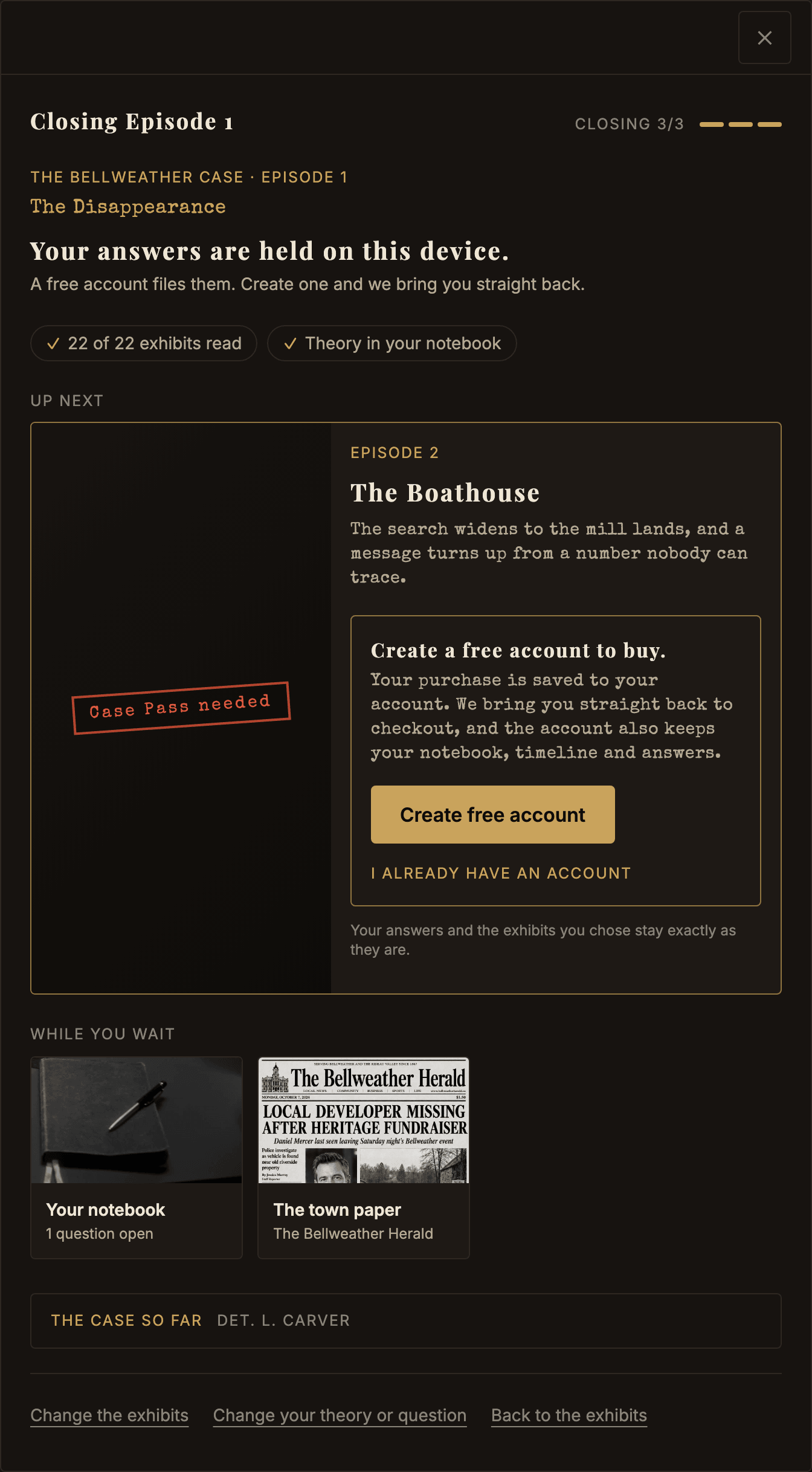
- Up next. Ticked chips sum up your week: answers filed, exhibits read, and what you kept. Up next is a card for the next episode, with Open Episode 4, a countdown and Add to calendar, or the Case Pass. Bring someone onto the case shares your progress as a picture or copies an invite link, with Follow the case icons under it. While you wait has cards for your notebook, the Forensics Lab and the town paper. The case so far folds away Det. L. Carver's recap. After Episode 1, How was Episode 1? under Up next asks for a star rating; skipping it changes nothing.
In the final episode there is no theory step. If it has questions, the button reads Choose the exhibits for your closing argument, and that screen sets the exhibits it stands on and nothing more. Either way, file the closing argument itself on the form on the page, with File my closing argument: filed once, and scored. It needs a suspect and at least one exhibit.
What is final, and what is not
Answers are final. Once you press File these answers, they are on the record and there are no take-backs, which is exactly why nothing is filed until you do.
A question you did not answer before the next episode opened says This question closed when Episode 5 opened. It scores nothing. Its answer is on the verdict page once the case closes.
Your chosen exhibits are not final. They are a running list. Come back next episode and move them around as the case turns over. On an episode you have answered the button reads Change the exhibits that prove it. On one whose questions closed before you got to it, it reads Choose the exhibits that prove it, because there is nothing to answer there. Either way the list is fixed only when you file your closing argument.
Your theory for each episode is the same, only more so. Have a theory and be prepared to change it. Each episode is kept as its own page, so at the finale you can read your own mind changing.
How many exhibits you can choose
In the final episode your closing argument names who did it and the exhibits that prove it. Naming who did it is worth the most on its own, but you must choose at least one exhibit to file. Every exhibit you choose that the case actually turns on pays on top of that. One that does not pays nothing and costs nothing.
You can file a closing argument until the verdict opens for everybody, a week after the final episode opens.
The case sets the number of places and the screen shows how many, so there is nothing to gain by holding one back. A pick too many is refused rather than quietly dropped: you are asked which place it replaces.
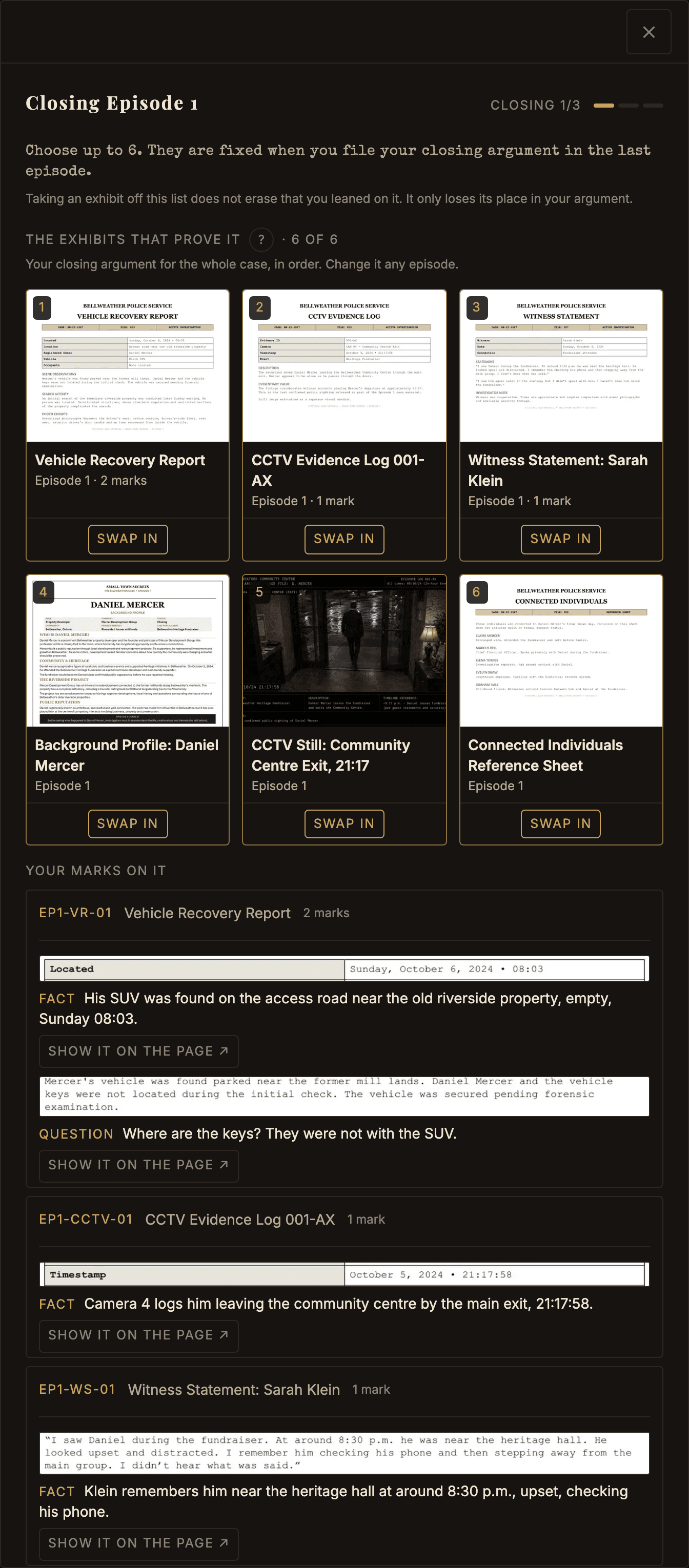
The order is your own. Put them in the order you would argue them, with the ← and → arrows. It changes nothing about the score.
Look at an exhibit before you choose it
On that step:
- A card in your list, or a label in the picker, unfolds the exhibit in a panel underneath. Press it again to fold it away.
- The picture in that panel is cropped. Press it to see the whole page, and again to shrink it back.
- The + beside a name adds the exhibit to your list.
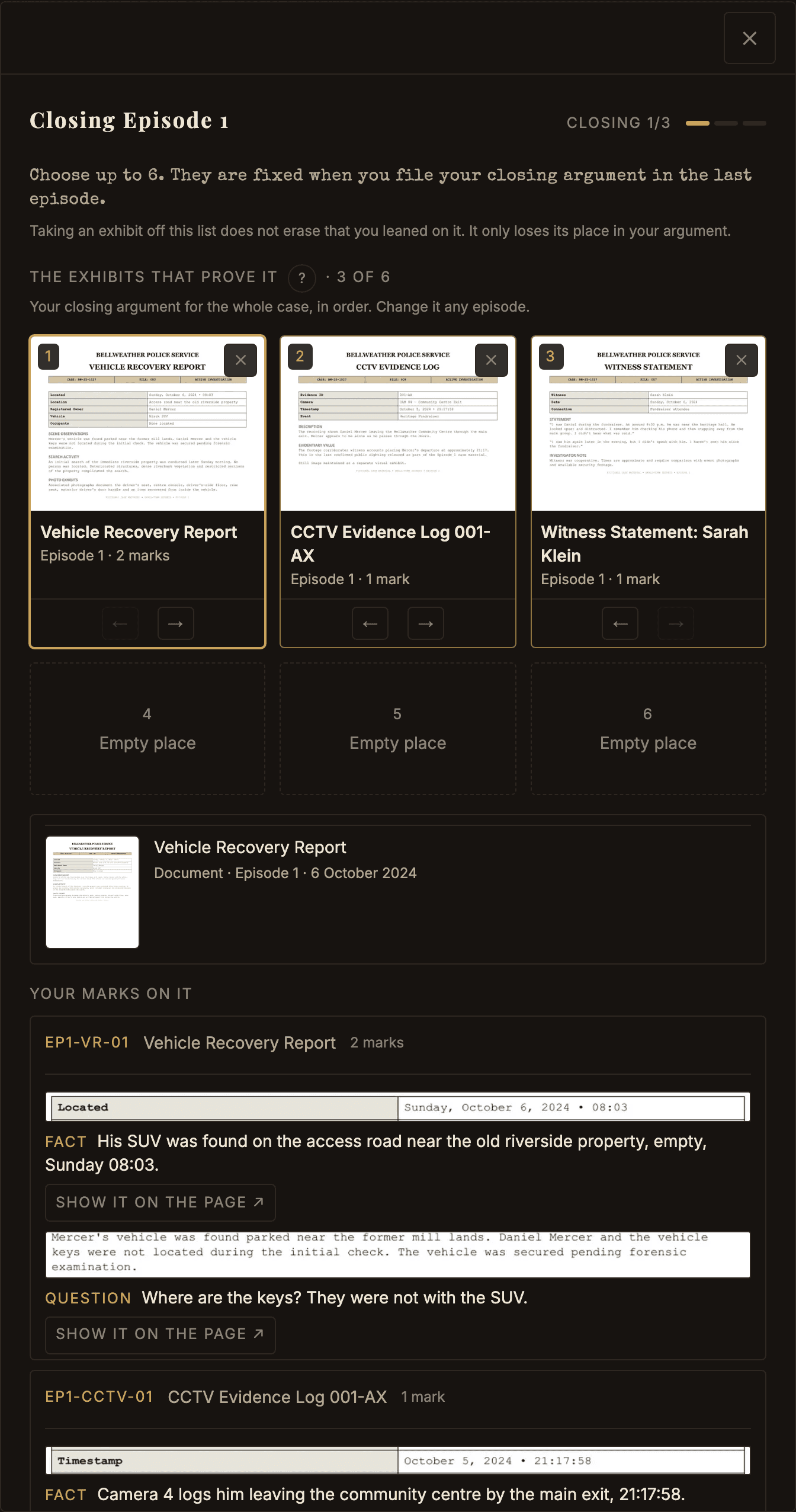
It is a glance and not the desk: no zoom, no tip line. Your marks on it, under your cards, shows your own words on each, so you can see why you picked it.
Exhibits you leaned on earlier
Every exhibit you choose when you finish an episode is remembered as one you leaned on. Nobody is told, and it is not part of anything you file.
The picker offers those first, then the exhibits from your timeline or notebook, with every other exhibit underneath. Choose the good ones in Episode 3 and your final list is a shortlist you already wrote. Leave it to the last night and it is the whole case, in one scroll, against the clock.
Inviting another investigator
Once your answers are filed, the last step offers Bring someone onto the case. Copy invite link hands them the case and only the case: not your suspect, your theory, your score or your standing, and no code on the link ties them back to you. Share progress sends a card showing the episode you filed, and nothing else.
Agencies
An agency is a team of up to six detectives who play the case together. You still file your own answers and keep your own score. Together you rank on the Agencies tab of the leaderboard.
Why start one
Play with your people. Split the reading, then argue the case over your theories. Your agency keeps its name, its tab and its record from one case to the next.
Starting and joining
Start an agency from the Agencies page. Choose a name, a motto if you like, and a crest. Your agency's name, crest, motto, founding date, detective names and standing are public. A name or motto can't name anyone in the case. You can belong to one agency at a time.
Joining takes an invite link. The founder or a partner copies it and sends it. Opening it shows the agency and Join this agency. A new link ends the old one.
Roles
The founder runs the agency: its details, roles, removing detectives, handing it over and closing it. Up to two partners pin the lead theory, remove posts and make new invite links. Everyone else is a member.
The roster lock and points
Rosters lock when Episode 4 opens. Part One of the Bellweather case was already under way when agencies opened, so its rosters lock later, when Episode 8 opens. After the lock nobody joins, leaves or is removed. Roles and details can still change. The Agencies page always names the episode that locks the case you are playing.
An agency's points are the average of its best four detectives' points. It joins the Agencies tab once two detectives have points.
The casebook
The casebook is your agency's private page. Sharing is always your choice: nothing goes in unless you share it, one item at a time. You can share a note, a mark, a timeline moment or a theory.
A shared item is a snapshot. Changing your notebook later doesn't change it. Withdraw takes it back whenever you like. A post from an episode a teammate hasn't opened yet stays hidden from them, so nobody is spoiled.
Lead theory and roll call
The founder or a partner can pin one theory as the lead theory. It stays on top until they pin another.
The roll call shows which teammates have filed this episode's answers. It says yes or no, never what they answered.
Feature us
Feature us is a box on your agency page, and it starts off. Ticked, it lets us name your agency in the Herald, the town paper, and on our social posts. Your founder can untick it at any time.
Leaving, closing and age
You can leave until the roster locks. A founder hands the agency to someone else first. A founder who is alone can leave, which closes the agency and takes its page down.
Agencies are for detectives 16 and older.
What Happens Next
Your answers are filed, and the case carries on without you for a few days.
Finding your way back
The last step is Up next: your summary, the case so far, and what comes next. That is Open Episode N if that episode is open, a countdown if it is not, the Case Pass if you are reading Episode 1 for free, or the verdict after the final episode.
Add to calendar reminds you when the next episode opens. Case Pass holders are emailed; anyone else can tap Email me when Episode N opens.
One link always works out where you left off: on the home page once you are signed in, on the page after a purchase, and in the receipt we email you.
On verdict day, Open your verdict on the home page plays the film, then shows the cards. The ending after them goes a scene at a time: Back and Continue, the arrow keys or a swipe. Skip to the end jumps to the last screen.
A case can run in two parts. When Part Two opens, a player of Part One sees it on the home page and on Part One's case page. A new player starts at Part One.
Your work, and where it lives
An account is the difference between work that follows you and work that does not, and the one thing here worth doing before you are told to.
With an account, your notebook, your timeline, the exhibits you leaned on and the answers you filed are kept on your account. Reload, close the tab or open your phone: it is all there, on every device you sign in on. Signing out clears this browser's copy; your account keeps it. To make one, press Create free account at the top of any page. Your detective name follows the account from case to case. A free account unopened for a year is deleted after an emailed warning; signing in keeps it.
Without one, all of it lives in the browser you are using, on the device you are holding, and nowhere else. That is enough to read and answer Episode 1, but fragile: a different browser shows you none of it, and clearing your history clears it. Unfiled answers score nothing, which is the whole of what an account changes.
That is why the last step asks. Finish Episode 1 without an account and it offers to file your answers. Create one and you land back where you were, answers and chosen exhibits intact. It takes a minute, and nothing you write is shared.
What the Case Pass opens
Episode 1 is free, and it stays free. The Case Pass opens the rest of one part of a case, and Both Parts opens Part One and Part Two together.
Everything already released opens the moment you join. Arrive when Episode 6 is out and all six are open that evening, not fed to you one a week. After that a new episode opens every Sunday for everyone, to the end of the case.
If the case has already finished, the pass opens every episode at once.
If you change your mind at checkout
Close the payment page, or press back, and nothing is charged. You land back where you were, with everything as you left it.
If you pay and the confirmation page seems unsure, give it a moment: the payment and the pass arrive separately. The page says it is still waiting and checks again on its own.
Questions
The questions people write in and ask. Nothing below gives anything away about any case.
How do I start?
Open the case and read Episode 1. If a case runs in two parts, start at Part One. Episode 1 is free in every case, and it stays free. You don't need an account to read it. Answer as you go, and create a free account to file your answers.
Episode 1 opens on the desk in stages (see The Desk): six exhibits, six more once you have opened them, then the rest, with a short video on marking the first time you open one. Once the whole file is in, the First shift checklist takes you the rest of the way. Changed your mind at Create a free account? The sign-up page has a Not now, back to the case link. That is the whole shape of an episode, and it takes about twenty minutes.
Where is the next episode?
One link always knows. It is on the home page once you are signed in, on the page after a purchase, and in the receipt we email you.
To navigate by hand: This case shows the episodes you can open, and Cases lists every case, with what a pass costs.
How do I know my answers are filed?
The page tells you the moment it lands, and we email a confirmation saying what was filed and when. You get it even with the Sunday email off.
What is Detective Carver's mark on the leaderboard?
A benchmark, not a player. It stands at about 60% of the points it has been possible to earn so far, so it rises as results come out. It has no place and never counts in anyone's rank.
What does the Case Pass include?
Episode 1, already free, and every other episode to the end of the case.
Everything already released opens the moment you join. If you arrive when Episode 6 is out, all six released episodes are open that evening. From then on a new episode opens every Sunday alongside everybody else, and the pass covers every remaining episode, the finale, and the verdict.
If the case has already finished, the pass opens every episode at once. A Case Pass covers one part of a case: not a subscription, and it does not expire. Both Parts covers Part One and Part Two together for less than buying them one at a time.
What do I see at the end without a pass?
The ending. A week after the final episode opens, the verdict page shows everybody how the case closed. The Case Pass keeps the solution, the exhibits that prove it, your scored verdict and the film.
When does the next episode release?
Sunday at 9:00 AM ET, every week, until the case ends. The case page counts down when it knows the date, and we email you when an episode opens if the Sunday email is on. Your results for the episode before come in that same email: one email a Sunday. Change that under Email preferences on your account page, where Browser notifications is an off-by-default switch.
I joined late. Am I behind?
No. A pass opens every episode released so far the moment you buy it, so the only difference between joining at Episode 1 and joining at Episode 6 is how much there is to read on your first evening.
The one thing you cannot do is answer a question after the next episode has opened. Those questions say This question closed when Episode N opened. It scores nothing. On those episodes the button at the foot of the page reads Choose the exhibits that prove it: there is nothing to answer, and the exhibits you choose and your theory for the episode still count. You can still file your closing argument and be scored on it until the verdict opens.
Can I give a Case Pass, or claim one I was given?
Yes to both. To give one, press Give it as a gift on the Cases page. You do not need an account. Name who it is for, add a message if you like, and pick now or a date.
To claim one, open the link in the gift email, or type its code (it starts GIFT) on your account page. Sign in or create a free account with any email, then claim it. If you already hold that case, the gift is not used up, so you can pass it on. Gifts never expire.
I paid but cannot access an episode.
Give it a minute. The payment and the pass are two separate messages, and the second occasionally arrives behind you. Your account page will say it is still waiting and check again on its own.
Still showing Case Pass needed a couple of minutes later? Write to support@smalltownsecrets.com from the address you signed up with and we will open it by hand. The delay costs you nothing.
Worth checking too: a Case Pass covers one part of a case. If you hold a pass for Part One and are looking at an episode of Part Two, the door you are being shown is correct.
Can I make the text bigger?
Two ways, and they work together. Your browser's zoom always works and nothing here caps how far it goes. Signed in, there is also Text size on your account page under Game settings, which offers Default, Large and Larger and follows your account to every browser.
Can I try new features early?
Yes: join The Forensics Lab under Game settings on your account page. The Lab page it links to lists what you have and ideas to try. Nothing there changes how the case is scored.
Can I play with a keyboard or a screen reader?
Yes. The whole game is reachable without a mouse.
Tab moves between controls and a gold outline shows where you are. Press Tab once on any page for a Skip to content link. Escape closes any pop-up and returns you to the control you opened it from. On the desk, Enter zooms a document and the arrow keys move around it.
If something gets in your way, write to support@smalltownsecrets.com and tell us what you were trying to do. That is a bug on our side, not yours.
Will you use what I write?
Not without asking, and not without you saying yes. Your notebook, theories, answers and debrief note are read without your name beside them and are never quoted anywhere.
The exception is a button you have to press. After Episode 1 and at the end of a case we ask how it was, and if you rate it well, what you would tell somebody thinking about starting. Under the box are two buttons: one sends your words to us and stops there, the other says we may put them on the site beside your detective name. A person here reads anything you allow us to quote, and plenty never go anywhere. Take the permission back any time from your account page and the words come off the site.
One favour: please do not say who did it. People read these before they have played.
What everything does
Every mechanic in one line. The same words sit behind the beside each one in the game, so you need not come back here for them.
- The exhibits
- Everything this episode arrived with. The questions stay locked until you have opened every exhibit once, and some of it will turn out to be nothing. Reading it is how you find out which.
- The tip line
- The department’s tip line. Each call reveals one lead on an exhibit. At Detective clearance you get 3 calls an episode, and calls you do not use earn bonus points when the episode is scored.
- The notebook
- Facts, assumptions, and the questions you cannot answer yet. Anything you would otherwise look up twice.
- The timeline
- Times, and what happened at them. On a case like this the gaps between the entries tend to matter more than the entries.
- Marking the page
- The line that says it, boxed where you found it. A mark keeps the words on the page they came from, so when two of them disagree you can go back and read both again.
- Fact, assumption or question
- A fact is what the page shows. An assumption is what you are treating as true for now. A question is what you still need answered. Keep them apart and you will know which of your ideas are holding the others up.
- Same moment
- Two sources for the same few minutes are one moment with two witnesses. When they agree the time gets firmer. When they do not, you have found something worth a question.
- Key events
- The handful of moments your theory stands on. Key events only shows just those, which is the whole case in a few lines, and the first place to look when it stops adding up.
- Ruling somebody out
- The people the town talks about. Ruling one out is your own note and nobody is told about it, so put them back on the board when the case turns.
- The episode's questions
- This episode’s questions. You answer them in one sitting. Nothing goes on the record until you press File these answers, and after that your answers are final.
- Confidence
- How sure you are of an answer. A hunch pays half and costs nothing when it is wrong. Certain pays half again and takes a real bite out of you when it misses.
- The exhibits that prove it
- The exhibits you would put in front of a jury. They are only scored when you file your closing argument, so nothing chosen today is binding and a pick you are unsure of costs you nothing.
- Your theory and question for each episode
- What you think happened, and the question you most need answered, on what you know today. Nothing scores them. The next episode shows both back to you, and at the finale you can see the episode you first had it right.
- Clearance
- How much help the desk gives you, and what the answers are worth when it does. You can change it later.